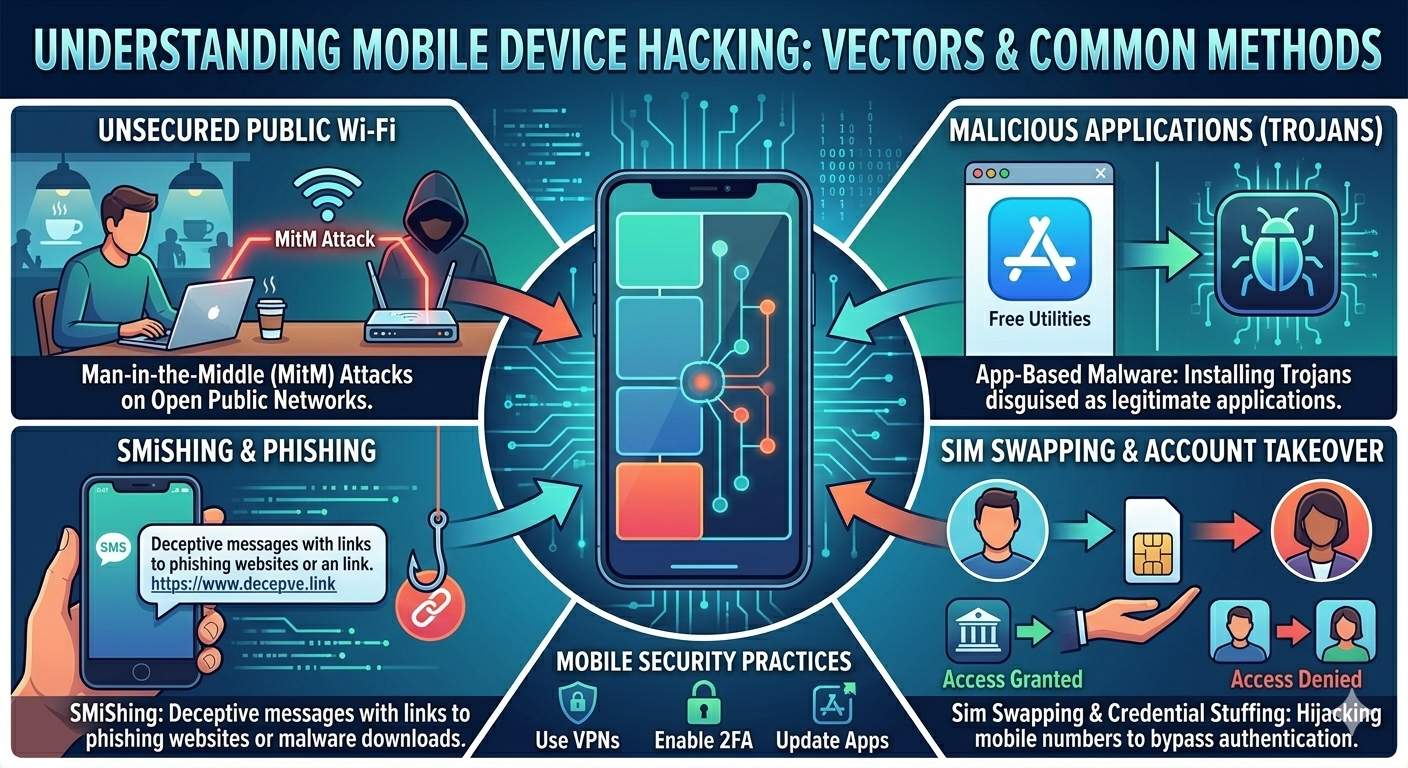
Exploring vulnerabilities and attack vectors unique to mobile platforms.
Mobile devices have become indispensable, holding vast amounts of personal and sensitive data. This makes them prime targets for attackers. Mobile hacking involves exploiting vulnerabilities in mobile operating systems (Android, iOS), applications, and network communications. This guide will cover common attack vectors, tools, and essential defensive strategies.
Mobile Attack Vectors
Attackers target mobile devices through various means:
1. Malicious Mobile Applications
Apps disguised as legitimate ones or containing hidden malicious functionalities (e.g., spyware, ransomware, banking Trojans). Often distributed via unofficial app stores or sideloading.
2. Network-Based Attacks
Public Wi-Fi Sniffing: Intercepting data over unsecured Wi-Fi.
SMS/MMS Phishing (Smishing): Sending malicious links or attachments via text messages.
Vishing: Voice phishing attacks.
SS7 Attacks: Exploiting vulnerabilities in the Signaling System No. 7 protocol to intercept calls/SMS, track location.
3. Device-Based Exploits
Operating System Vulnerabilities: Exploiting flaws in Android or iOS (e.g., zero-days, unpatched bugs).
Rooting/Jailbreaking: Compromising device security to gain root access, often making the device more vulnerable.
Physical Access: If an attacker gains physical control, they can bypass lock screens, extract data, or install malware.
Exploiting vulnerabilities in mobile web browsers or web views within apps (e.g., XSS, SQL Injection, insecure API calls).
Convergence: Mobile devices are susceptible to both traditional web vulnerabilities and unique mobile-specific threats.
Mobile Hacking Techniques
Specific methods used to compromise mobile devices and data:
1. Malware Injection & Sideloading
Installing malicious APKs (Android) or IPA (iOS) files directly onto devices, bypassing app store security.
2. Reverse Engineering Mobile Apps
Decompiling APKs/IPAs to understand their code, identify vulnerabilities, or extract sensitive information (e.g., API keys, hardcoded credentials).
# Decompile an Android APK using apktool
apktool d example.apk

# Use Jadx to decompile to Java source code
# jadx -d out example.apk
3. Mobile Forensics & Data Extraction
Accessing and analyzing data from mobile devices, often after physical acquisition or logical backups.
Tools: Cellebrite, UFED, Oxygen Forensics.
4. Exploiting Insecure Data Storage
Accessing sensitive data stored insecurely on the device (e.g., in plain text files, insecure databases, shared preferences).
5. Insecure Communication
Intercepting and manipulating network traffic if apps use unencrypted HTTP or have certificate pinning bypass vulnerabilities.
# Intercepting mobile app traffic via Burp Suite proxy
# Configure mobile device to use Burp as proxy.
# Install Burp's CA certificate on the device for HTTPS interception.
6. Client-Side Injection (e.g., XSS in WebViews)
Injecting malicious scripts into web views within mobile applications, similar to web application XSS.
Quick Question:
Which tool is commonly used to decompile Android APK files for reverse engineering?
Mobile Hacking Tools (for ethical purposes)
A range of tools assist ethical hackers in assessing mobile security:
1. ADB (Android Debug Bridge)
A versatile command-line tool for communicating with Android devices. Used for installing/uninstalling apps, pushing/pulling files, and accessing shell.
# Connect to a device
adb devices

# Install an APK
adb install app.apk

# Get a shell on the device
adb shell

# Pull a file from the device
adb pull /data/data/com.example.app/databases/data.db .
2. Frida / Objection
Dynamic instrumentation toolkits that allow injecting scripts into running processes on Android and iOS. Used for bypassing security controls (e.g., SSL pinning), runtime analysis, and API hooking.
A web proxy used to intercept, inspect, and modify HTTP/HTTPS traffic between mobile apps and backend servers. Crucial for API security testing.
4. MobSF (Mobile Security Framework)
An automated, all-in-one mobile application (Android/iOS/Windows) pen-testing, malware analysis and security assessment framework capable of performing static and dynamic analysis.
A comprehensive security assessment framework for Android. It allows interacting with Android components (activities, services, content providers, broadcast receivers) to find vulnerabilities.
# Connect to Drozer agent on device
drozer console connect

# Find attack surface (example)
# run app.package.attacksurface com.example.app
Lab Setup: Mobile hacking often requires setting up emulators, rooted/jailbroken devices, and proxy configurations.
Countermeasures Against Mobile Hacking
Securing mobile devices and applications requires a multi-faceted approach:
1. For Users:
Keep OS & Apps Updated: Apply security patches regularly.
Download Apps from Official Stores: Avoid sideloading or unofficial sources.
Review App Permissions: Grant only necessary permissions.
Use Strong Passwords & Biometrics: Protect device access.
Enable Remote Wipe: For lost/stolen devices.
Be Wary of Public Wi-Fi: Use VPNs.
Avoid Rooting/Jailbreaking: Unless for specific, controlled security testing.
2. For Developers:
Secure Coding Practices: Follow OWASP Mobile Top 10 guidelines.
Secure Data Storage: Encrypt sensitive data at rest.
Secure Communication: Use HTTPS/TLS, implement certificate pinning.
Input Validation: Prevent injection attacks.
API Security: Implement strong authentication and authorization for mobile APIs.
Code Obfuscation & Tamper Detection: Make reverse engineering harder.
Regular Security Audits: Perform penetration testing and vulnerability assessments.
Shared Responsibility: Both users and developers play a crucial role in mobile security.
Conclusion
Mobile hacking presents unique challenges due to device portability, diverse operating systems, and app ecosystems. A strong understanding of mobile-specific attack vectors and robust defensive strategies is essential for protecting sensitive data on these ubiquitous devices.
Key takeaways:
Diverse Attack Surface: OS, apps, network, physical access.